Pianist has turned Professional on the iPad
Pianist Pro for the iPad takes the best-known iPhone piano, Pianist, to a whole new level. We've added a great arpeggiator, a drum machine, a choice of instruments, and a completely new interface that makes playing piano scales fun again. With Pianist Pro you need never be without your piano.

Video Demonstrations
Screenshots can only go so far to describe a musical instrument. We therefore encourage you to sit back and watch as we show off some of the features of Pianist Pro-
Features
Choose a keyboard style
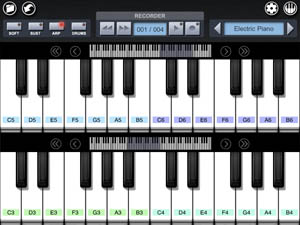
Pianist Pro offers two representations of the standard piano keyboard -

The 'Single Keyboard' provides a large key area, allowing you to set the velocity of each note depending on where you hit the key. Press the top of the key for soft notes, and press further down for louder notes.
Alternatively, the 'Dual Keyboard' gives you two independently scrollable views onto the same piano keyboard, allowing you to play both left and right hand parts simultaneously. Set up each view to point to the section of the piano that you want, to reach a maximum of six octaves at once without needing to scroll.
Set the number of keys to suit your playing style. More keys means you will be able to reach more notes without having to scroll the window. Less keys means you will find it easier to play chords with notes that are physically close together. The keys react instantly to your touch, depressing and casting shadows just like the real thing, and even move on playback of your song for a 'pianola' effect.
Add expression
A pitch bend / modulation wheel and swell (volume) pedal can be optionally displayed over the keyboard to allow extra emphasis to be added to the recording.
Although not common on digital pianos, These controls come into their own for the additional instruments that pianist has to offer such as organs, guitars and synths.
Both controls look and feel just like their real-world counterparts. The modulation wheel can even be used to control a low-pass filter for the synth instruments.
Play scales effortlessly
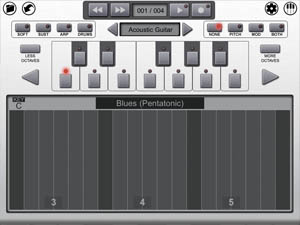
The 'Scale Piano' allows you to play any scale in any key merely by sliding a finger up and down the screen.
Select from a range of preset scales (from standard scales such as Major and Natural Minor, to more specialised scales such as Pentatonic Blues, Persian Gypsy or Chinese), or create your own.
You can even change scale and key in the middle of playing a run of notes.
At last, playing scales on a piano can be fun!
Add a rhythm accompaniment
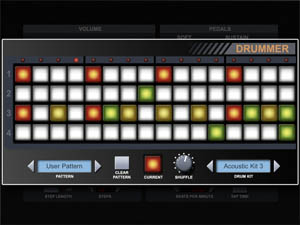
A built-in drum machine offers an elegantly simple interface for adding rhythm, with a choice of drum kits to suit a variety of musical styles.
Four drum sounds (kick, snare, open and closed hihats) at three drum intenstity levels lets you compose a range of rhythms, and a shuffle control can be used to add a touch of swing.
Have fun with the arpeggiator
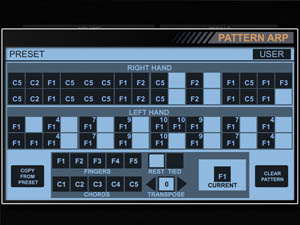
A fully featured arpeggiator allows you to play complex and perfectly timed runs of notes from holding down a few keys. As well as the standard modes (Up, Down, Up/Down, Random), Pianist Pro includes a new mode called the 'Pattern Arp', allowing you to define patterns of notes that turn a simple held chord into a complex musical phrase.
Pianist Pro makes it easy to play shuffle-beat blues, complete with walking bassline and overlayed jazz chords - all by holding one single chord. Changing the chord changes the melody but maintains the tight rhythm provided by the arpeggiator.
Use your iPad as a wireless MIDI keyboard
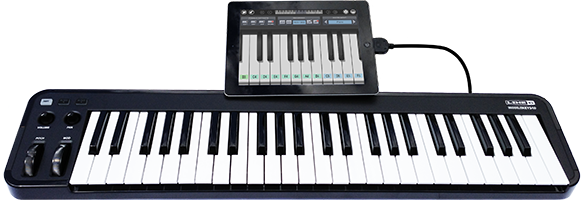
With Pianist Pro you can control your Digital Audio Workstation (eg. GarageBand or Logic) and soft and hardware synths wirelessly. MIDI data is sent from the iPad by wi-fi using OSC, which is translated on your PC or Mac into MIDI messages. Note up and down messages are sent, along with volume, modulation and pitchwheel changes, which can be routed to any MIDI CC controller. Play your hardware digital piano from the sofa, or even from another room!
[Please see the instruction manual for more information on setting up and using OSC on your network]
Enjoy the Settings screens
With Pianist Pro, even changing the application settings is a joy -

A key design goal in Pianist Pro was to remain as close to the real world as possible. We have found that this helps to mask the fact that one is interacting with a computer screen rather than an instrument, promoting creativity. The real world design goes beyond the piano screen, however. Application settings retain the look and feel of a digital piano or synthesiser, with dials that can be turned and sliders that can be moved. And those settings that have no real-world control (such as the number of keys to display on the keyboard) we display on a notepad (complete with requisite coffee stain) as if the user had kept performance notes for the song.
Instruction Manual
A fully comprehensive instruction manual is provided within the application, and can additionally be viewed here before purchase.
Recent Changes
We believe in keeping our applications up to date, and providing great new functionality with each free update.V1.2
- Added OSC Support. Now you can use Pianist Pro as a wireless MIDI keyboard controlling your Digital Audio Workstation and software or hardware synthesizers.
- You can now choose one of the following time signatures for a new song: 1/4, 2/4, 3/4, 4/4.
V1.1
- Added File Sharing. Song data files can be exported to a Mac or PC for sharing with other Pianist Pro users.
- Added MIDI export. Your song data can be exported to a Standard MIDI file, ready to be imported into a Digital Audio Workstation.
- Changed the hit boxes of the piano keys so that the topmost area of the white keys can now be played.
Hi-Res Press Images
For further information please contact: press@moocowmusic.comApp Icon (Large)
Title Screen (Large)
Screenshot 1
Screenshot 2
Screenshot 3
Screenshot 4
Screenshot 5